
Home Blog Page 7

How to Manage Your Financial Documents in India: The 2026 Checklist

A senior partner at a Delhi law firm called me a few years ago. His father had passed away suddenly. The family knew there were fixed deposits, mutual funds, insurance policies — 30 years of disciplined saving. They spent six months trying to find them. Some they never found at all.

His father had saved carefully his whole life. He just hadn’t organised it.

According to the Finance Ministry, our post offices hold billions in unclaimed National Savings Certificates and savings accounts. Not because people don’t want their money. Because the documents were lost, misfiled, or simply never recorded. And maybe the original investor never told anyone.

Document management isn’t a boring admin task. It’s the last act of financial responsibility — to yourself and to the people who come after you.

⚡ Quick Answer

Managing financial documents in 2026 means: (1) a master list of all accounts and nominations, (2) DigiLocker for government-issued and SEBI-mandated financial documents, (3) physical originals of will and property papers in a secure location your family knows about, and (4) digital nominees updated across every financial account. Your family shouldn’t need a court order to access what’s already legally theirs.

How Most People Actually Manage Documents — and Why It Fails

A document arrives. You put it on your desk, meaning to file it. Then it moves to a drawer. Then to a wardrobe shelf. Six months later you can’t find it — but you remember paying the premium, so the policy must exist somewhere.

This isn’t carelessness. It’s human nature. The document arrived, your brain registered that the task was done, and it moved on. The problem is that “paying the premium” and “organising the proof of the policy” are two different tasks. Most people only complete the first one.

The goal of any document management system should be simple: your spouse, or your children, should be able to find every financial account, every policy, every investment, within 30 minutes — without calling you.

The Master Document List: Start Here

Before apps and digital lockers, you need one thing: a master list. A single Excel file that your family can open and immediately understand the complete picture of your financial life.

Every row is one account or policy. Every row has: account type, institution name, account/folio/policy number, approximate value, nomination status, and login ID. Not passwords in plaintext — that’s a separate, encrypted file. But enough that your family knows what exists and where.

This file is password-protected. Your spouse knows the password. It lives on your personal laptop and has a backup copy — not on email, not on WhatsApp, on a USB drive or external hard disk kept with a trusted family member.

Review it once a year. Every time you open a new account or buy a new policy, add a row before you close the browser.

What to Keep and What to Discard

Most people either keep nothing or keep everything. Both are wrong.

Keep permanently: Property and land documents, vehicle registration, will, original insurance policies, share certificates (if any still in physical form), loan agreements, and the last three years of income tax returns.

Keep for 6 months then shred: Bank statements (if you have online access), utility bills (after payment), premium receipts for policies where you have the policy document.

You don’t need to keep at all: Every MF statement ever generated (keep only the latest CAS), every bank statement older than 6 months if you’re online, duplicate copies of anything available on DigiLocker.

Use a colour-coded folder system if you prefer physical filing. Red for most critical (property, will, insurance), blue for investments, green for tax. The colour doesn’t matter — the consistency does.

DigiLocker: Now Mandatory for Your MF and Demat Statements

If you set up DigiLocker when it launched in 2015 and haven’t looked at it since, it’s time to revisit.

As of April 2025, following a SEBI circular, all AMCs, RTAs, and depositories must register as issuers on DigiLocker. This means your mutual fund holding statements, transaction statements, and Consolidated Account Statement (CAS) are now retrievable directly through DigiLocker — no more logging into six different portals.

What makes this genuinely powerful is the nominee feature. You can designate a nominee inside DigiLocker itself. After your demise, that nominee can authenticate through their own DigiLocker account and access your financial holding statements. Not the assets themselves — those still transfer through legal nomination — but the knowledge of what exists. That knowledge alone is worth six months of your family’s time.

DigiLocker is at digilocker.gov.in. It’s free, Aadhaar-linked, and OTP-secured. Setup takes 15 minutes. Add a DigiLocker nominee this week — it’s a 5-minute task most people never do.

The Nominee Problem: Your Most Neglected Financial Task

Here is the uncomfortable truth. If you invested in mutual funds before 2022, there’s a good chance your nomination records are incomplete, outdated, or missing entirely. SEBI’s mandate on nomination was strengthened in 2023 — but compliance across old folios is still patchy.

This isn’t a paperwork inconvenience. Your family may need to go to court to claim money that’s already legally theirs. That process can take months and significant legal fees.

Do this today — it takes under 20 minutes:

Mutual funds: Go to MFCentral.com. Log in with your PAN and mobile OTP. You can update nominees across all fund houses in one place.

Bank accounts: Most banks now allow nominee updates through net banking under “Service Requests.” Or visit the branch with your Aadhaar — it’s a single form.

Demat accounts: Log into your CDSL or NSDL portal and update nominees under account services.

Insurance policies: Log into your insurer’s customer portal or call their service line. Nominee update is typically under “Policy Services.”

NPS: Log into your NPS account on the CRA portal and update your nominee there. NPS is a retirement account — the nominee on this one matters enormously.

The Will Problem Nobody Talks About

Most people know they need a will. Very few think about where it’s kept.

⚠️ Common Mistake: Will in the Bank Locker

If your will is locked in your bank locker and only you have the key, your family needs the will to open the locker — but the will is inside. Banks won’t open a locker without a death certificate, identity proof, and legal heir documentation. The very document that could simplify this is inaccessible.

Keep your will in three places: one copy with your executor (the person named to carry out your wishes), one copy with your lawyer, and a scanned copy in DigiLocker. Your family should know who the executor is and how to reach them. That conversation is uncomfortable. Have it anyway.

Managing Passwords Without Creating a New Problem

Every financial account has a login. Managing these is its own challenge — and storing them carelessly creates a different kind of risk.

Maintain a password-protected Excel file with account IDs and password hints — not the actual passwords written out, but in a format only you and your spouse understand. Keep this file on your personal laptop only. Never email it, never put it on cloud storage in plaintext. Share the master password verbally with your spouse.

For the accounts themselves — never use the same password across financial accounts. Never store credit card CVV numbers or ATM PINs digitally. If you use a password manager, use one that stores data locally or on an encrypted vault, not one where a third-party company holds the keys to your financial life.

Is your financial estate in order?

Nominations, will, document management — these work together. At RetireWise, we help senior executives build a complete plan their families can actually use when it matters.

Talk to a RetireWise Advisor

Frequently Asked Questions

What is DigiLocker and how does it help with financial documents?

DigiLocker is a government-backed digital platform linked to your Aadhaar. Since the SEBI circular of April 2025, your MF statements, demat holdings, and CAS are available directly in DigiLocker. It’s free, legally valid as an original, OTP-secured, and accessible from anywhere. You can also designate a DigiLocker nominee who can access your financial documents after your demise.

Which financial documents should I keep physically vs digitally?

Keep physical originals in a bank locker or fireproof safe: property and land documents, original insurance policies, vehicle registration. Keep digital on DigiLocker: PAN, Aadhaar, MF statements, CAS, insurance premium receipts. Keep a master Excel sheet with all account numbers, nomination details, and login hints — password protected and shared with your spouse.

How do I update nominees for mutual funds and bank accounts?

For mutual funds: visit MFCentral.com, log in with PAN and OTP, and update nominees across all fund houses in one place. For bank accounts: update through net banking or at the branch. For demat accounts: log into your CDSL or NSDL portal. Do this for every account — it’s the single most important act of document management.

Should I keep my will in a bank locker?

No. If only you have access to the locker, your family will need the will to open the locker — but the will is inside. Keep one copy with your executor, one with your lawyer, and a scanned copy in DigiLocker. Your family should know who the executor is before they ever need to reach out.

How should I store passwords for financial accounts securely?

Maintain a password-protected Excel file with account IDs and password hints in a format only you and your spouse understand — not plaintext passwords. Keep it on your personal device only. Never email it. Share the master file password verbally with your spouse. Never store CVV numbers or ATM PINs digitally.

Your financial life is more complex than your parents’ was. The accounts are more numerous, the digital trails more scattered, and the nominations more likely to be outdated.

The question isn’t whether you need a system. It’s whether you’ll build it before your family needs it — or after.

💬 Your Turn

Does your spouse know where your will is kept — and who the executor is? If you paused before answering, that’s your to-do for this weekend.


The 3 Stages of Retirement — A Letter to a Client About to Retire

Dear Suresh (name changed),

In three months, you’ll stop going to office. After 31 years at the same company, the same route, the same 8:42 train from Thane — it all stops.

I know you’re excited. You’ve been talking about this for two years. The Ladakh trip. The morning walks without rushing. The grandchildren. You’ve earned all of it.

But I also know — because I’ve sat across from hundreds of people in your exact position — that what comes next is not quite what you’re imagining. It’s better in some ways. Harder in others. And it unfolds in three distinct stages that nobody tells you about.

I’m writing this letter because I want you to know what’s coming. Not to scare you. To prepare you.

The three stages of retirement - active phase, slow-go phase, and inactive phase - and how to plan finances for each

Stage One: The Go-Go Years (60–70, approximately)

This is the stage you’re dreaming about right now. And you should dream about it — it’s real.

In the first 5-10 years of retirement, you’ll have energy, health, and — for the first time in decades — time. This is when people travel, pick up hobbies they’d postponed, spend longer mornings with chai and the newspaper, and finally read those books stacked on the bedside table.

Your expenses in this stage will actually be higher than you expect. I’ve seen this with every client. You’ll travel more. You’ll eat out more. You’ll spend on experiences you’ve been deferring. The Ladakh trip you’re planning? That’s a go-go expenditure. The cooking classes Meera (name changed) wants to take? Go-go.

Here’s what I want you to understand, Suresh: this is good spending. This is what the money is for.

“The biggest regret I hear from people in their 70s is not that they spent too much in their 60s — it’s that they didn’t spend enough. They saved for a tomorrow that looked nothing like they imagined.”

— What I tell every client entering the go-go years

I’m not saying be reckless. I’m saying your withdrawal plan is designed for this. We’ve built your portfolio so that the first decade draws more, the second draws less, and the third is protected. Trust the plan. Enjoy the years.

A few practical things for this stage: your employer health insurance ends the day you retire. We’ve already arranged a ₹25 lakh family floater — that stays. Keep 6-8 months of expenses in a savings account for emergencies. And if you haven’t drafted your will yet, this is the month to do it. I’ll nag you until it’s done, and you know I will.

One more thing. In the go-go years, your identity shifts. You’ve been “Suresh from L&T” for three decades. Suddenly you’re just Suresh. At home. Without a title. This is harder than the financial transition — I promise you. Give yourself time. The discomfort passes.

Stage Two: The Slow-Go Years (70–80, approximately)

Around 70 — sometimes earlier, sometimes later — things change. Not dramatically. Gradually.

The Ladakh trips become Lonavala weekends. The morning walks get shorter. The knees complain. The energy is there, but it comes in smaller portions. You’ll still travel, still socialise, still enjoy life — but the pace will be different. And that’s not failure. That’s just life doing what life does.

I’ve watched this transition with dozens of clients. The ones who handle it well are the ones who don’t fight it. They don’t try to maintain go-go intensity. They find a new rhythm.

Your expenses in this stage will naturally decrease. Less travel. Fewer restaurant meals. But — and this is important — your medical expenses will rise. Medications, specialist visits, possibly a knee replacement or cataract surgery. This is where the health insurance we’ve built becomes critical.

Your investment portfolio in this stage should be more conservative than it was in the go-go years. We’ll shift equity allocation down gradually — not because equities are bad, but because your ability to absorb a 30% market crash at 75 is different from your ability at 62. We’ve already planned this in your asset allocation glide path.

Suresh, the slow-go years are when your relationship with Meera deepens in unexpected ways. Your children will be in their 40s, busy with their own lives, possibly in different cities. You and Meera will spend more time together than you have since your first year of marriage. I’ve seen this go beautifully for couples who talk about it honestly. I’ve seen it go badly for couples who don’t.

Talk to her. Not about money. About what your days will look like.

Every stage of retirement needs a different financial plan.

We don’t just plan for retirement day. We plan for the go-go, slow-go, and no-go years — so your money outlasts every stage.

Plan All Three Stages

Stage Three: The No-Go Years (80+)

This is the stage nobody wants to talk about. So I’m going to talk about it.

After 80, life slows significantly. For some, it’s physical — mobility reduces, hearing fades, the body demands more care. For others, it’s cognitive — memory softens, decisions feel heavier. For many, it’s both.

Your expenses in this stage will be lower overall — you won’t be travelling or dining out. But your medical costs may spike. Full-time home care, hospital stays, specialised treatments — these are expensive. A private nurse in a metro city today costs ₹25,000-40,000 per month. That number will be higher by the time you reach this stage.

This is why we’ve set aside a separate medical emergency corpus in your plan. This is also why your nomination and legal heir structure matters. If — and I say this with care — you reach a point where you can’t make financial decisions yourself, someone trustworthy needs to be authorised. We’ve already discussed Power of Attorney with your son. Let’s finalise it.

“Dignity in the no-go years isn’t about wealth. It’s about not being a burden — and that requires planning, not luck.”

— A line I wrote in my book, and I believe it more with every passing year

Suresh, I’m not telling you all this to darken your mood three months before retirement. I’m telling you because the difference between a retirement that works and one that doesn’t is not how much money you have. It’s whether you planned for all three stages — not just the exciting first one.

Most people plan only for the go-go years. They imagine retirement as an endless holiday. It isn’t. It’s a 25-30 year journey with distinct chapters. Each chapter needs its own financial strategy, its own emotional adjustment, and its own definition of a good day.

You and I have built a retirement plan that accounts for all three. Your corpus is structured to spend more early and protect more later. Your insurance covers the middle and late years. Your legal documents are nearly in place.

The money part is handled.

Now here’s my last piece of advice — and I say this as someone who’s been your advisor for twelve years and, I hope, something of a friend.

Enjoy the go-go years without guilt. Adjust to the slow-go years without resentment. And prepare for the no-go years without fear.

That’s what a good retirement looks like. Not one stage. All three.

I’ll be here for all three stages.

Warm regards,
Hemant

Retirement has three acts. Most people only plan for the first.

Let’s make sure your plan covers every chapter — the adventures, the adjustments, and the years that need protection.

Build a Plan for All Three Stages

💬 Your Turn

Which stage of retirement are you in right now — or which one are you most worried about? What does your “good day” look like in that stage?

Why You Should Invest Regularly: The Power of Doing the Boring Thing Consistently

“Compound interest is the eighth wonder of the world. He who understands it, earns it. He who doesn’t, pays it.” – Albert Einstein

What’s the one thing that separates people who retire comfortably from those who struggle?

It’s not a higher salary. It’s not a lucky stock pick. It’s not even brilliant timing. It’s the boring, unglamorous habit of investing regularly, month after month, year after year. No drama. No excitement. Just discipline.

In 25 years of advising, I’ve never met a wealthy person who got there through a single brilliant trade. But I’ve met hundreds who got there through consistent SIPs that they started and simply never stopped.

⚡ Quick Answer

Regular investing through SIPs works because of three forces: the power of compounding (your returns earn returns), rupee cost averaging (you buy more units when markets are low), and behavioural discipline (it removes emotion from the equation). A ₹10,000 monthly SIP at 12% for 25 years grows to over ₹1.8 crore. The key isn’t how much you invest. It’s that you never stop.

Why Should You Invest Regularly? Benefits of Regular Investing

Read More – Aligning Investing with Life Goals

Why Regular Investing Beats Everything Else

1. Your Savings Are Already Monthly. Your Investments Should Be Too.

India is a country of savers. We save almost 30% of our income, among the highest in the world. Our income is monthly (salary, rent, interest). Our expenses are monthly (EMI, groceries, school fees). Our budgeting is monthly.

But when it comes to investments? Most people treat it as a once-a-year, last-week-of-March panic exercise. They dump money into tax-saving products in February and call it “investing.” That’s not investing. That’s tax management disguised as a financial plan.

The best time to invest is when you have surplus money. Since surplus comes monthly, investments should be monthly too.

2. The Double Benefit of Investing Immediately

When you invest the moment your salary hits your account, two powerful things happen:

First, your money gets maximum time. And time is the most powerful force in investing. A rupee invested today has 30 years to compound. A rupee invested next month has 29 years and 11 months. That one month’s head start, repeated every month for decades, creates a massive difference in your final corpus.

Second, you stop overspending. When there’s excess money sitting in your savings account, it gets spent. On that phone upgrade you didn’t need. On that impulsive online order. On eating out because “we deserve it.” If the money is invested before you see it, you can’t spend it. Simple. Effective. Life-changing.

Must Check – Every Investor Should Know The Two Poisons of Investing

The Power of Compounding: Let the Numbers Speak

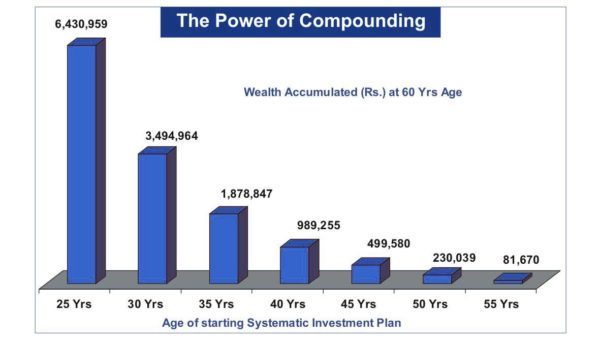
Let’s see what ₹10,000 per month at 12% annual return does over different time periods:

Time Period Total Invested Value at 12% Wealth Gain
10 Years ₹12 Lakh ₹23.2 Lakh ₹11.2 Lakh
15 Years ₹18 Lakh ₹50.5 Lakh ₹32.5 Lakh
20 Years ₹24 Lakh ₹99.9 Lakh ₹75.9 Lakh
25 Years ₹30 Lakh ₹1.89 Crore ₹1.59 Crore
30 Years ₹36 Lakh ₹3.53 Crore ₹3.17 Crore

Look at those last two rows. You invested ₹30 lakh over 25 years and it became ₹1.89 crore. You invested ₹36 lakh over 30 years and it became ₹3.53 crore. The extra 5 years nearly doubled the corpus while adding only ₹6 lakh more in investment. That’s compounding doing its magic in the final stretch.

Power of compounding

The New Savings Formula

Most people follow this formula: Savings = Income – Expenses

Change it to: Expenses = Income – Savings

Pay for your retirement first. Pay for your future goals first. Then spend what’s left. This one shift in mindset, if you follow it for 20 years, will change your financial life more than any stock pick ever could.

Ready to start but not sure where to invest?

A structured financial plan matches your SIPs to your goals, risk profile, and time horizon.

Talk to a Financial Advisor

Where Should You Invest Regularly?

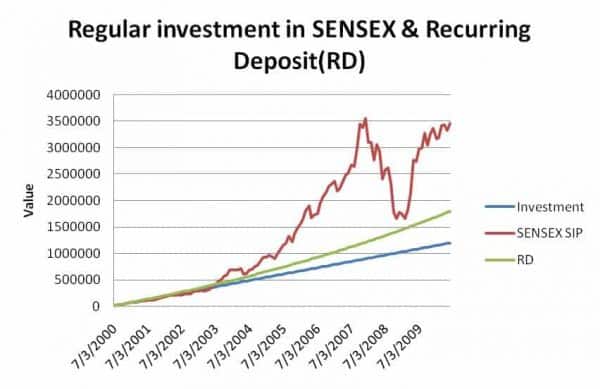
For short-term goals (1-3 years), recurring deposits or debt mutual funds work well. But for long-term goals like children’s education, retirement, or wealth creation, equity mutual funds through SIP are the proven path.

Equities are volatile in the short run but have consistently beaten inflation over the long run. Traditional instruments like bank RDs and post office schemes fail to beat inflation after tax. If your goal is 10-15 years away, equity SIPs give you the best chance of building real wealth.

Read – Types of Mutual Funds in India: Complete Guide

What Nobody Tells You About Regular Investing

Here’s the paradox of SIPs that almost nobody discusses.

SIPs work best when you’re losing money. Yes, you read that right. When markets fall, your SIP buys more units at lower prices. Those “extra” units purchased during crashes are the ones that generate the most wealth when markets eventually recover. The March 2020 crash terrified everyone. But SIP investors who continued investing during that period saw some of their best returns ever in the following 2 years.

The problem? Most investors stop their SIPs during crashes because it “feels wrong” to keep investing when everything is falling. This is exactly backwards. Stopping your SIP during a market crash is like cancelling your gym membership because you gained weight. The crash is precisely when your SIP is doing its best work.

The investors who build the most wealth aren’t the ones who started at the right time. They’re the ones who never stopped.

Benefit of Regular Investing

The journey of ₹1 crore starts with a ₹10,000 SIP

Start today. The best time was 10 years ago. The second best time is now.

Start Your Financial Plan

Frequently Asked Questions

What is the benefit of investing regularly through SIP?

Three main benefits: compounding (your returns earn returns over time), rupee cost averaging (you automatically buy more units when markets are low), and behavioural discipline (it removes emotion and procrastination from the equation). Together, these three forces turn small monthly amounts into significant wealth over 15-25 years.

How much should I invest in SIP per month?

Start with whatever you can afford consistently, even ₹5,000. The amount matters less than the consistency. As your income grows, increase your SIP by 10-15% annually. A ₹10,000 monthly SIP growing at 10% step-up annually can build a significantly larger corpus than a flat ₹25,000 SIP over the same period.

Should I stop my SIP during a market crash?

Absolutely not. Market crashes are when SIPs do their best work because you’re buying more units at lower prices. Stopping your SIP during a crash locks in the psychological damage without getting the recovery benefit. Continue investing and let rupee cost averaging work in your favour.

Where should I invest my SIP for long-term goals?

For goals 7+ years away, equity mutual funds through SIP are the most effective vehicle. For goals 3-7 years away, balanced or hybrid funds work well. For goals under 3 years, stick to debt funds or recurring deposits. The instrument should match the time horizon, not your current market sentiment.

Wealth isn’t built in a day. It’s built every month, quietly, through the boring discipline of investing regularly. The magic isn’t in what you buy. It’s in the fact that you never stop buying.

Do the Right Thing and Sit Tight.

💬 Your Turn

How long have you been running your SIPs? And have you ever stopped one during a market crash? Share your experience in the comments.

10 Reasons People Avoid Financial Planning – and the One Real Reason They Don’t Say

“For every complex problem there is an answer that is clear, simple, and wrong.” – H.L. Mencken

She earned Rs 18 lakh a year. Smart, senior HR professional at a large company in Pune. Every time I brought up financial planning in conversation, she changed the subject. After three years, I finally asked her directly why.

“I don’t know where to start,” she said. “And honestly, I’m a little embarrassed I don’t know more about it at my age.”

That is the real reason most people avoid financial planning. Not the 10 reasons they give.

⚡ Quick Answer

People avoid financial planning for reasons that sound rational but are mostly emotional – overwhelm, embarrassment, false confidence, or simply inertia. The surprising truth is that the people who most need a financial plan are usually the ones most convinced they do not. Recognising which excuse you use is the first step to getting past it.

10 Honest Reasons People Avoid Financial Planning

1. “I Don’t Really Understand What Financial Planning Is”

This is the most honest reason – and the least shameful. If you grew up in a family that did not talk about money systematically, financial planning as a concept can feel abstract and intimidating. The media makes it worse by mixing it with investment tips, stock market commentary, and insurance advertisements until the whole subject feels like noise.

Financial planning is simply this: figuring out where you want to go financially and building a road map to get there. Everything else – investments, insurance, tax planning – is just the vehicle. If you do not have a destination, no vehicle matters.

2. “I Know About It But I’m Not Convinced It Works”

This one is trickier. You have read about financial planning, maybe even attended a seminar. But you have also seen people with “plans” who still ran into financial trouble. So you remain skeptical.

The distinction is between a plan and a written, professionally constructed plan that is actually followed. Most people who say they have a plan have a vague intention. An intention and a plan are not the same thing.

3. “Financial Planning Is for Rich People”

A client once told me he could only save Rs 2,500 a month after all expenses. Why pay Rs 15,000 for a financial planner to manage Rs 15,000?

My answer: a financial planner is not a guardian of your current wealth. A good one helps you create more of it – by identifying where your money is leaking, restructuring how you save, and showing you what Rs 2,500 a month in equity compounding over 20 years actually becomes. That answer is usually a surprise.

4. “I’ve Already Done It – I Have Insurance and SIPs Running”

This is the most dangerous one because it feels most correct. You have term insurance. Monthly SIPs in two mutual funds. A PPF account. A home loan for tax benefit.

But do you know what these together will become at retirement? Do you know if the SIP amount is sufficient for your retirement age? Is your insurance cover adequate for your liabilities? Do your investments connect to specific goals with specific timelines?

Having financial products is not the same as having a financial plan. A plan connects all the products to goals and tells you whether you are on track.

THE PLANNING GAP – WHAT MOST PEOPLE MISS

Owning financial products is not financial planning.

Making investments is not financial planning.

Saving tax is not financial planning.

Financial planning is connecting all of the above to specific goals, with timelines, and knowing whether you are on track.

5. “Investing Is the Same as Financial Planning”

Investing is one component of financial planning – important, but not the whole picture. A person who only focuses on investment planning is like someone who studies the engine but ignores the brakes, the fuel tank, and the destination.

Financial planning covers insurance (what protects your plan), tax planning (what improves your efficiency), estate planning (what happens after you), and cash flow planning (what keeps everything running month to month). Investment returns are meaningless if a single uninsured medical emergency wipes out the corpus.

Wondering if you actually have a plan – or just products?

At RetireWise, we build written retirement blueprints for senior executives. SEBI Registered. Fee-only. No products sold.

See How RetireWise Works

6. “I’m Lucky – Things Have Always Worked Out”

Some people genuinely believe they are financially charmed. Maybe they sold property at the right time. Maybe their parents left them an inheritance. Maybe their company gave generous ESOPs.

Past luck is not a financial plan. The market does not know your track record. One bad health event, one job loss, one wrong real estate call in your 50s – at a stage when you have no time to recover – can undo decades of incidental good fortune. Insurance companies have a word for this: exposure.

7. “I Can Handle It Myself”

This is the most common reason among smart, educated professionals. You have an MBA. You read financial news. You have managed your own portfolio for years. Why would you need a planner?

Consider: you are an expert in your field. Would you manage your own legal contracts, diagnose your own medical conditions, and represent yourself in a tax dispute – purely because you are smart and educated? The same logic applies here. Financial planning is a specialised discipline with specific expertise, regulatory knowledge, and experience across hundreds of client situations that no individual accumulates on their own.

8. “I’ll Start Next Month”

Procrastination is the most expensive financial decision most people make. Every year of delay in starting a retirement plan is not just one less year of saving – it is one less year of compounding. The cost of a 5-year delay in starting a retirement SIP at 35 versus 40 is not 5 times your annual investment. It is multiples of that, because of compounding.

The genie of compounding only works with time. Time is the one input you cannot buy back.

9. “Advisors Are All Commission Salesmen”

This used to be largely true – and for commission-based agents, it still is. But SEBI’s fee-only RIA framework has created a category of advisors who are legally required to act in your interest, charge you directly, and not earn commissions from any product they recommend. The incentive structure is completely different.

The existence of bad advisors is not a reason to avoid all advice. It is a reason to choose the right kind – SEBI-registered, fee-only, fiduciary.

10. The Real Reason Nobody Says Out Loud

Here is what I have observed in 25 years: the actual reason most people avoid financial planning is not lack of knowledge, not distrust, not cost. It is fear of what the numbers might reveal.

If you have been spending more than you should, if your retirement corpus is far behind where it should be at your age, if you have been buying insurance policies that were wrong for you – a financial planning conversation makes all of that visible. It forces accountability.

People avoid doctors for the same reason. The diagnosis is feared more than the disease.

“Planning for financial goals makes people more confident about their finances. Not less. The fear of what you might find out is almost always worse than what you actually find out.”

– Hemant Beniwal, CFP, CTEP | Founder, RetireWise

Read next: Do You Need a Financial Planner? 7 Honest Reasons – and When You Don’t

The most expensive financial decision is the one you keep postponing.

RetireWise builds written retirement plans for senior executives aged 40-60. SEBI Registered. Fee-only.

See the RetireWise Service

The HR professional in Pune eventually sat down with me. Her number was better than she expected in some areas and worse in others – exactly as she had feared. But she left the meeting with a written plan, a clear action list, and something she had not felt about money in a long time: control.

The right question was never “should I do financial planning?” It has always been “what am I afraid to find out?”

💬 Your Turn

Which of these 10 reasons resonates most with where you have been – or where you still are? Be honest. Nobody else can see your comment.

Financial Freedom in India: The Honest Guide (It’s Not What Instagram Shows You)

“Financial freedom is available to those who learn about it and work for it.” – Robert Kiyosaki

What does financial freedom actually mean to you? Not the Instagram version with Bali sunsets and laptops on the beach. The real version. The one where you can answer this question honestly: if you stopped working tomorrow, how long would your money last?

If the answer makes you uncomfortable, you’re not alone. Most Indians earning ₹3 lakh+ per month still can’t answer this question with confidence. And that’s the gap between dreaming about financial freedom and actually achieving it.

Freedom is not a word. It’s a feeling. It’s what you feel when there are no doubts, no barriers, and no financial worries keeping you up at night. It’s knowing that you and your family are protected regardless of what happens to your job, the economy, or the stock market.

⚡ Quick Answer

Financial freedom means having assets that generate enough income to cover your lifestyle without needing to work. It’s not about having the best house or car. It’s about having the freedom to choose. The path requires widening the gap between income and expenses, converting savings into income-producing assets, and building a system that survives inflation for 30+ years.

Here's How you can achieve Financial Freedom?

Read More – Follow the 50 30 20 Rule to Make Better Financial Life

Financial Freedom Is Not What You Think

Financial freedom is not about having the biggest house in town or the latest model car or a foreign trip every year. I’ve seen people with all of those things who are deeply financially stressed because they’re one job loss away from disaster.

In simple language, financial freedom means having money or assets that provide you a perpetual income sufficient for a comfortable lifestyle. But it’s actually more than that. It’s having the freedom to choose: work because you want to, not because you have to. Spend time with family without worrying about the next EMI. Sleep peacefully knowing your retirement is sorted.

But Why Should You Want Financial Freedom?

There should be a strong motivation behind your desire for financial independence. “I’m tired of my job” is not strong enough fuel for a multi-decade journey. You need something deeper.

A few months back, I got an email from a 25-year-old reader:

📌 Reader’s Email

“I have ₹30 lakh in bank FDs at 9% interest. I’m 25, newly married, and I need ₹30,000 per month. I’m really tired and need rest. Is this possible?”

My reply was direct: “Tired at 25 is not a good sign. Take a 15-day break. You are the biggest asset of your family, much bigger than ₹30 lakh.” Yes, ₹30,000 per month is possible from that portfolio. But the value of ₹30,000 will shrink sharply every year because of inflation. Job frustration isn’t a strong enough reason to stop working at 25. You need a bigger motivation: more time with family, work of your choice, social impact, creative pursuits.

Financial Freedom Guide

Must Check – Behavioural Finance: How Your Mind Sabotages Your Money Decisions

The 4 Building Blocks of Financial Freedom

1. Income: It’s Not Just Your Salary

Your salary depends on things partly outside your control: your company, the economy, your boss’s mood. But here’s what most people get wrong: a salary increase alone will never make you financially free.

I’ve seen it hundreds of times. Someone gets a 30% hike, feels rich for two months, then their expenses rise to match the new income. Next year, same frustration. The problem was never how much they earned. It was how much they kept.

Think beyond salary. Rental income, dividend income, interest income, side income from skills. The more income sources you have, the less dependent you are on any single one.

2. Expenses: The Part Nobody Wants to Face

I know most readers want to skip this section because it hits where it hurts. But the truth is simple: the greater the gap between earning and spending, the faster you achieve financial freedom.

Whether you earn ₹1 lakh a month or ₹10 lakh a month, without a budget, your money will find a way to disappear. A budget isn’t punishment. It’s your most powerful wealth-building tool.

Check – 6 Steps of Financial Planning Process

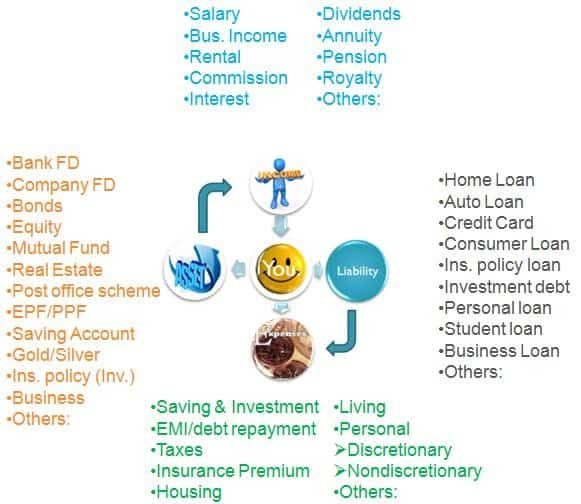
3. Assets vs. Liabilities: The Question That Changes Everything

Robert Kiyosaki said it best: “An asset puts money in your pocket. A liability takes money out.”

Now ask yourself honestly: is your house an asset or a liability? If it’s generating rental income, it’s an asset. If you’re paying EMI on it, living in it, and it’s not generating any income, it’s a liability disguised as an asset. Your car? Almost always a liability. That gold jewellery sitting in the locker? A liability with storage costs.

If you want financial freedom, spend your life buying income-generating assets. If you want to stay trapped, keep buying liabilities and calling them investments.

Assets Vs Liabilities

4. Inflation: The Silent Thief

₹30,000 per month feels comfortable today. In 20 years, you’ll need ₹1.2 lakh per month for the same lifestyle (at 7% inflation). Any financial freedom plan that doesn’t account for inflation is just a slow path to poverty. This is why FDs alone can never make you financially free. The real return on FDs after inflation and tax is often negative.

Want to calculate your actual financial freedom number?

It’s not a round number you picked from the internet. It’s a specific calculation based on your expenses, inflation, and life expectancy.

Talk to a Financial Planner

What Nobody Tells You About Financial Freedom

The FIRE movement (Financial Independence, Retire Early) has exploded in India. The FIRE_Ind subreddit has over 65,000 members. A 2024 survey found 43% of Indians under 25 want to retire before 55.

But here’s what the spreadsheet warriors won’t tell you: the popular “25x expenses” rule and “4% withdrawal rate” come from American research based on US inflation (2-3%) and US market returns. In India, where inflation runs at 6-7% and healthcare costs rise at 12-14%, the maths is far less forgiving.

I’ve seen clients who “achieved FIRE” at 45 and came back to me at 52, stressed because their corpus was shrinking faster than they planned. They underestimated healthcare inflation, overestimated market returns, and forgot about the lifestyle creep that happens when you have unlimited free time.

Real financial freedom in India isn’t about hitting a number and quitting your job. It’s about building a system that generates income, adjusts for inflation, and survives for 30-40 years without you touching the principal. That requires a withdrawal strategy, not just an accumulation strategy.

16 Rules for Your Financial Freedom Journey

1. Pay yourself first. Savings come before spending, not after.

2. Budget every month and actually stick to it.

3. Never dip into savings for electronics, gadgets, or impulse purchases.

4. Save and invest your yearly bonus. Don’t blow it on lifestyle upgrades.

5. Build at least 5 sources of income: salary, interest, dividends, rental, side income.

6. Money is your servant, not your master. Don’t let EMIs dictate your life choices.

7. Value time over money. Don’t be penny wise and pound foolish.

8. Don’t buy a car to impress others. A car is a depreciating liability, not a status symbol.

9. Don’t buy a house bigger than your family needs. Extra square footage is extra EMI for no extra happiness.

10. Don’t spend money just because you have it.

11. Remember how much you wasted on things you don’t even remember buying.

12. Live below your means. Not within them. Below.

13. Shun all non-essential debt.

14. Stop impulsive buying. Only buy what you planned to buy.

15. Delay major purchases by 30 days. If you still want it after a month, buy it.

16. Keep learning about personal finance. It’s the one skill that pays dividends your entire life.

Must Read – The 3 Stages of Retirement

Financial freedom isn’t about retiring early. It’s about having choices.

The choice to work because you love it. The choice to say no. The choice to sleep peacefully.

Start Your Financial Plan

Frequently Asked Questions

What is financial freedom in simple terms?

Financial freedom means your assets generate enough income to cover your lifestyle without you needing to work. It’s not about having crores in the bank. It’s about having a system where your money works for you, covering expenses, inflation, and emergencies for the rest of your life.

How much money do I need for financial freedom in India?

The popular “25x annual expenses” rule gives a rough estimate. If you spend ₹1 lakh per month (₹12 lakh per year), you’d need ₹3 crore. But in India, with 6-7% inflation and 12-14% healthcare inflation, you likely need 30-35x expenses. The exact number depends on your age, lifestyle, health, and withdrawal strategy.

Is the FIRE movement realistic in India?

Partially. The principles of saving aggressively and investing wisely are sound. But the American 4% withdrawal rule doesn’t directly apply to Indian conditions where inflation is higher and social security is almost non-existent. A realistic FIRE plan in India requires a lower withdrawal rate (3-3.5%), healthcare inflation adjustment, and a proper withdrawal strategy, not just an accumulation target.

What’s the first step toward financial freedom?

Change the formula. Most people save what’s left after spending. Flip it: spend what’s left after saving. Start with a budget, automate your investments through SIPs, and work with a financial planner to calculate your actual freedom number based on your specific circumstances.

Financial freedom isn’t a destination. It’s a direction. Every rupee you save and invest wisely is one step closer. Every impulse purchase is one step back.

Do the Right Thing and Sit Tight.

💬 Your Turn

What does financial freedom mean to you personally? Not the textbook definition. Your definition. And what’s the one thing stopping you from getting there? Share in the comments.

The 50-30-20 Rule: How to Budget Your Way to Retirement Wealth

“A budget is telling your money where to go instead of wondering where it went.” – Dave Ramsey

A client came to me frustrated. He was earning Rs 2.5 lakh per month. He had no debt. His lifestyle was comfortable. And yet, at the end of every month, he had no idea where the money had gone.

Not a saving crisis. Not a spending crisis. A clarity crisis.

Most budgeting systems fail not because they are wrong but because they are too complicated to sustain. Tracking every rupee across 15 categories sounds thorough – and lasts about three weeks before collapsing under the weight of its own complexity.

The 50-30-20 rule works because it is simple enough to maintain for years. Three buckets. Three decisions. And within that simplicity, a framework that quietly builds retirement wealth if you use it correctly.

⚡ Quick Answer

The 50-30-20 rule divides your take-home income into three categories: 50% for needs (housing, food, utilities, insurance, transport), 30% for wants (dining, travel, entertainment), and 20% for financial goals (retirement savings, debt repayment, emergency fund). It works because it is simple, flexible, and sustainable. For a senior executive, the 20% bucket is not just budgeting discipline – it is the engine of retirement wealth creation.

50-30-20 rule - how to allocate income for needs, wants and financial goals

The Three Buckets: How the Rule Works

50% – Needs. The non-negotiables. Housing (rent or EMI), groceries, utilities, health insurance, motor insurance, and commuting costs. These are expenses that would seriously disrupt your life if you stopped paying them. As a rough guide, housing alone should not exceed 15% of your total income. If your EMI or rent exceeds 25% of take-home pay, the 50% bucket will be strained and something else has to give.

The test for needs vs wants is simple: would stopping this expense require a significant change in how you live? If yes, it is a need. If no, it is a want.

30% – Wants. Lifestyle spending that improves the quality of your life but is discretionary. Dining out, family vacations, streaming subscriptions, gadget upgrades, clothing beyond basics. These are worth spending on – a life spent only on necessities is not the goal. But this is the bucket that most consistently bleeds beyond its limit, particularly in households with growing incomes and social pressure to maintain a certain lifestyle.

The wants bucket needs active monitoring. The needs bucket is relatively stable. The savings bucket is best automated. So in practice, the 30% is where the discipline lives.

20% – Financial Goals. This is the bucket that determines your financial future. Retirement corpus SIPs, debt repayment (beyond minimums), emergency fund building, children’s education investments. This 20% is not what is left after spending – it is the first allocation from your salary, automated on the day your salary arrives.

“Most people save what is left after spending. The 50-30-20 rule inverts this: you spend what is left after saving. That single reversal is worth more than any investment decision.”

– Hemant Beniwal, CFP, CTEP | Founder, RetireWise

The Retirement Math Inside the 20% Bucket

For a senior executive earning Rs 3 lakh per month take-home, 20% means Rs 60,000 per month directed toward financial goals. Here is what that does over time.

Rs 60,000 per month invested in a diversified equity portfolio at 12% CAGR for 15 years: approximately Rs 3 crore. That is the retirement contribution from the 20% rule alone – before EPF, NPS, or any existing investments are counted.

Rs 60,000 per month for 20 years at 12%: approximately Rs 5.9 crore.

The 50-30-20 rule is not just a budgeting framework. Used consistently by a high-income professional, the 20% bucket is the primary engine of retirement corpus creation. The percentages are the discipline – the compounding does the work.

Do you know what your current 20% is building toward?

A RetireWise retirement plan maps your savings rate to a specific retirement corpus target – so the 20% has a destination, not just a direction.

Book a Free 30-Min Call

How to Apply the 50-30-20 Rule in India

Step 1: Calculate take-home income, not gross. The percentages apply to net salary after all statutory deductions (EPF, professional tax, income tax). EPF contributions count toward your 20% – most people forget this and double-count. Check your actual EPF contribution first before setting a fresh SIP target.

Step 2: Automate the 20% first. On salary day, before any spending occurs, SIPs and recurring investments execute automatically. What remains in the account is the 80% available for needs and wants. The psychology is different: you are spending what is left, not saving what is left.

Step 3: Audit the 30% quarterly, not daily. Daily expense tracking is where most budgets die. Instead, review your wants spending every quarter. If the wants bucket is consistently at 35-40%, identify the two or three categories driving the overage and make a conscious decision about whether they belong in needs (which would require reducing other needs) or whether they need to be trimmed.

Step 4: Adjust percentages to your life stage. The 50-30-20 split is a starting framework. A 35-year-old with a home loan, young children, and an aggressive retirement target may need to push the savings bucket to 25-30% by compressing wants. A 55-year-old who has cleared debt, launched children, and has substantial existing investments may comfortably maintain 20% with more in the wants bucket. The framework is a structure, not a sentence.

The Senior Executive Adjustment: Why 20% May Not Be Enough

The 50-30-20 rule was designed for general audiences. For a senior executive in India earning Rs 3-10 lakh per month with a retirement target of 10-15 years away, 20% is often insufficient – particularly if a late start means compounding years are limited.

A more aggressive framework for the 45-55 age group: 50% needs, 20% wants, 30% financial goals. The wants reduction from 30% to 20% is uncomfortable but manageable – it means one fewer international vacation per year, a delayed car upgrade, fewer luxury purchases. The mathematical consequence of that discomfort is 50% more going to the retirement corpus over a decade.

The question to ask: what is the cost in retirement of spending 30% on wants now versus 20%? Put a number on it. Make the trade-off visible and conscious rather than invisible and habitual.

Read – Your Annual Bonus Is a Retirement Accelerator. Are You Using It Right?

Read – The Real Key to Wealth Creation: Why Starting Early Beats Everything Else

Frequently Asked Questions

What if my needs already exceed 50% of my income?

This is common in metro cities with high housing costs. If genuine needs exceed 50%, do not try to compress them artificially – that creates unsustainable strain. Instead, accept a temporarily higher needs allocation (say 55-60%) and protect the 20% savings bucket by reducing wants. The priority order is: protect the 20% first, then adjust the needs/wants split within the remaining 80%. Never raid the 20% to accommodate lifestyle inflation.

Does EPF count toward the 20%?

Yes. Your EPF contribution (and your employer’s matching contribution, for retirement planning purposes) counts toward the 20% financial goals bucket. Many professionals discover they are already saving 12-15% through EPF alone, meaning only 5-8% more in voluntary SIPs reaches the 20% target. Check your salary slip before setting up new SIPs.

How do I handle windfall income – bonuses, incentives?

Windfalls should not default to the wants bucket. A pre-committed rule: 50% of every bonus goes directly to retirement corpus, 30% to near-term financial goals (loan prepayment, education fund), 20% to discretionary spending. The same 50-30-20 logic applied to variable income ensures that lifestyle inflation does not absorb every increment and bonus automatically.

The 50-30-20 rule does not require willpower. It requires automation. Set up the 20% to move on salary day. Set the 50% as a ceiling for non-negotiables. Give the 30% to present enjoyment without guilt. The system does the work – not the discipline of checking accounts every day wondering where the money went.

Budget for your savings, not your spending. The order of operations changes everything.

Want to know if your current savings rate is on track for your retirement target?

RetireWise maps your savings rate to a specific retirement corpus and timeline – so the 20% has a real destination.

See Our Retirement Planning Service

💬 Your Turn

Have you tried the 50-30-20 rule – and which bucket is hardest to control in your household? Share in the comments.

15 Types of Risk in Investment Every Indian Should Know (2026 Guide)

“Risks come from not knowing what you are doing.” – Warren Buffett

Someone asks me for a “risk-free investment with good returns” and I genuinely do not know where to begin. Not because the question is silly. Because the word “risk” is doing so much work in that sentence – and most investors have only one risk in mind when they say it.

Losing money. That’s it. One risk. There are at least 18.

⚡ Quick Answer

Risk in investing is not just losing money – it is any uncertainty that makes your actual return differ from your expected return. There are 18 types, split broadly into investment risk, inflation risk, systematic vs unsystematic risk, debt-specific risks, and behavioral risks. The most dangerous ones for retirement portfolios are concentration risk, information risk, and sequence of returns risk.

The Two Most Basic Types of Risk

Before getting into the full list, understand the two foundational risks every investor faces:

1. Investment Risk

The possibility of losing principal. You invest Rs 5 lakh in equity and get back Rs 4 lakh after 3 years. This is what most people mean when they say “risky.” It can be measured by standard deviation.

2. Inflation Risk

Losing purchasing power even when you do not lose money. You invest Rs 5 lakh in debt and get Rs 10 lakh after 8 years. But Rs 10 lakh in 2026 buys what Rs 6 lakh bought in 2018. You doubled your money and still lost ground. Inflation is a slow, invisible tax on wealth – and the most underestimated risk for retirement.

🚫 The “Safe Investment” Illusion

FDs and debt funds feel safe because they do not show negative returns. But at 6% return and 7% inflation, you are losing purchasing power every year. A corpus that feels adequate at retirement may be dangerously inadequate by age 75. Safety from investment risk does not mean safety from inflation risk.

Systematic vs Unsystematic Risk

3. Systematic Risk

Also called market risk or non-diversifiable risk. It affects the entire economy – an interest rate hike, a pandemic, a geopolitical crisis. You cannot diversify away from systematic risk within a single country’s market. Beta measures how sensitive your investment is to this risk.

4. Unsystematic Risk

Affects a single company or sector. Bad management, product failure, regulatory action against one industry. This is diversifiable – owning 20 different companies across sectors eliminates most of it. The famous “don’t put all eggs in one basket” advice addresses this risk specifically.

Are you managing risk – or just hoping for the best?

At RetireWise, risk management is built into your retirement plan – not added as an afterthought. SEBI Registered. Fee-only.

See How RetireWise Works

Risks in Debt Investments

This is the section most investors skip – and most advisors gloss over. Debt is not safe. It has its own set of risks, and ignoring them has cost investors dearly.

5. Credit Risk (Default Risk)

When a company cannot pay principal or interest. SBI pays 7%. A small NBFC NCD pays 12%. The extra 5% is not generosity – it is the price of credit risk. Companies that defaulted in India – CRB Capital, IL&FS, DHFL, Yes Bank AT1 bonds – all paid “attractive” rates before defaulting. Bank FDs have credit risk too; DICGC covers only Rs 5 lakh per depositor per bank. Beyond that, you carry full credit risk.

6. Interest Rate Risk

Bond prices move opposite to interest rates. If you hold a 10-year bond at 7% and rates rise to 8%, your bond’s market value falls. This does not matter if you hold to maturity – but matters enormously in debt mutual funds, which mark to market daily. The longer the duration, the higher the interest rate risk.

7. Reinvestment Risk

You lock in at 9% for 5 years. When the FD matures, rates are 6.5%. You must reinvest at lower rates. This compounds over decades. Retirees who depend on interest income face this risk every time their FDs roll over.

8. Liquidity Risk

You hold bonds but there are no buyers when you need to sell. You may have to accept a steep discount to exit. Many corporate bonds in India have paper yields that look attractive but trading volumes near zero – meaning you are effectively locked in until maturity or default.

9. Country Risk (Sovereign Risk)

Even government bonds carry this risk. PIGS countries in Europe – Portugal, Ireland, Greece, Spain – showed that sovereign debt can be restructured. In India, some government-backed company deposits have deferred maturity payments in the past.

Other Investment Risks

10. Exchange Rate Risk

You invest in US equities and earn 12% in dollar terms. But the rupee strengthens 4% against the dollar that year. Your actual INR return is 8%. NRIs face this constantly – a strong rupee erodes the value of overseas earnings when repatriated. Always factor currency risk into cross-border investment decisions.

11. Timing Risk

Investing a large amount at a market peak, or exiting at a trough. Don’t take this risk. The solution is not timing – it is systematic investing through SIPs and not letting headlines drive decisions.

12. Volatility Risk

Day-to-day price fluctuations in equity. Measured by standard deviation. High volatility is not the same as high risk if your time horizon is long – but it tests investor psychology brutally. Most people abandon good investments during volatile periods and lock in losses.

13. Political / Regulatory Risk

A government policy change that hurts a sector overnight. Telecom, sugar, oil & gas, pharma, real estate – all have seen sudden regulatory changes in India that wiped out significant value. No sector is immune.

14. Valuation Risk

Buying a good company at the wrong price. Infosys was a great company in 2000 and in 2010 – but investors who bought at the 2000 peak waited years just to break even. Good business + expensive valuation = poor investment.

15. Business Risk and Technology Risk

Industries become obsolete. Pagers, typewriters, audio cassettes, floppy disks – all had thriving companies. Kodak failed not because it made bad film but because film became irrelevant. Today: consider exposure to retail banks, print media, and traditional auto before assuming safety.

THREE RISKS THAT DESTROY RETIREMENT PORTFOLIOS SPECIFICALLY

1. Sequence of Returns Risk – a bad market in Years 1-3 of retirement wrecks the corpus permanently

2. Longevity Risk – outliving your money by 5-10 years is more common than people plan for

3. Concentration Risk – ESOP-heavy portfolios where one company = 40-60% of net worth

Most standard risk questionnaires measure none of these three. This is why retirement planning needs a specialist lens.

16. Execution Risk

The gap between the price you see and the price you actually get when the trade executes. Affects direct equity investors more than mutual fund investors. In illiquid stocks, execution risk can mean buying at significantly higher or selling at significantly lower prices than expected.

17. Concentration Risk

All your eggs in one company, one fund, or one asset class. I have seen it with Satyam. I have seen it with ESOP-heavy portfolios where 60% of someone’s net worth sits in their employer’s stock. When the company struggles, the investor faces both income risk (job) and wealth risk (stock) simultaneously. Diversification is cheap insurance.

18. Information Risk

Decisions made on incomplete or misleading information. The mutual fund ad showing 100% returns – point-to-point returns cherry-picked from a specific date. The loan “at 9%” that is actually 16% once you understand flat vs reducing rate. The NBFC deposit paying 12% where the credit risk is buried in fine print.

“If you torture numbers enough, they will confess to almost anything. The asterisk – Aster-RISK – always hides something. Train yourself to look for it.”

– Hemant Beniwal, CFP, CTEP | Founder, RetireWise

There are other risks too – institutional risk, operational risk, geopolitical risk, counterparty risk, management risk, prepayment risk, legal risk. The list is genuinely long.

The next time someone asks for a “risk-free investment,” you know what to say. There is no such thing. There is only choosing which risks you are willing to carry – and which ones you understand well enough to manage.

Read next: What is Financial Planning? The 6-Step Process That Actually Works

Understanding risk is step one. Managing it in retirement is another story.

The RetireWise Retirement Blueprint stress-tests your corpus against sequence risk, inflation risk, and longevity risk – not just market returns. SEBI Registered. Fee-only.

See the RetireWise Service

Equities are risky. Debt is risky. Cash is risky (inflation). Doing nothing is risky. The question was never “how do I avoid risk.” The question has always been “which risks am I taking – and do I understand them well enough to stay the course?”

Risk comes from not knowing what you are doing. Now you know.

💬 Your Turn

Which of these 18 risks have you personally experienced in your investments? And which one surprised you most on this list? Tell me below.

IPO Myths in India: 6 Things Every Investor Must Know Before Applying

“IPO does not stand for Initial Public Offering. It stands for It’s Probably Overpriced.” – Benjamin Graham

Your WhatsApp group is buzzing about the next big IPO. Your colleague made ₹50,000 on listing day. Your Telegram channel says “apply karo, guaranteed listing gains.” So why shouldn’t you jump in?

Because the stories you hear are from the winners. The losses stay quiet. In early 2026, 7 out of 11 mainboard IPOs gave negative listing gains. SME IPO listing gains crashed from over 60% in 2024 to just 2.63% by early 2026. The party isn’t what it used to be.

I’ve watched IPO manias come and go since 2003. The Reliance Power IPO of 2008, the LIC IPO of 2022, the PayTM listing. Every cycle has the same script: euphoria, oversubscription, reality check. Let me walk you through 6 myths that cost Indian investors money every IPO season.

⚡ Quick Answer

Most IPO myths revolve around guaranteed listing gains, company stability, and retail investor advantage. In reality, IPOs are priced for the seller’s benefit, not the buyer’s. SEBI data shows SME listing gains collapsed to 2.63% in early 2026, and 7 of 11 mainboard IPOs listed negative. The smart approach: skip the hype, let the stock prove itself post-listing, and invest through mutual funds if you want IPO exposure.

IPO Myths India

Must Read – Why Most Indian Retail Investors Lose Money in Stocks

6 IPO Myths That Cost Indian Investors Money

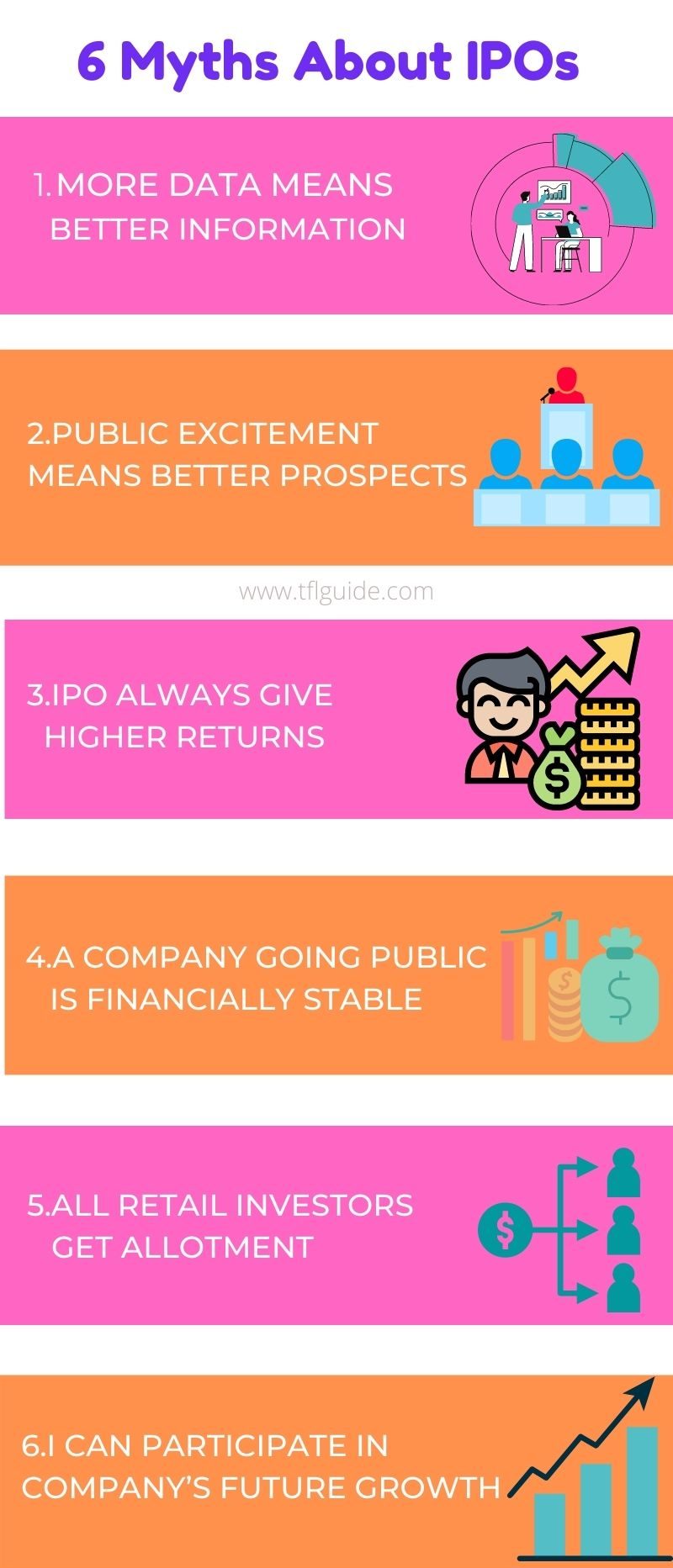
Myth 1: More Information Means Better Decisions

When a well-known brand comes for listing, the media blitz is overwhelming. TV channels, newspapers, Instagram reels, YouTube breakdowns. The sheer volume of information creates an illusion of confidence. You feel like you “know” the company.

But information isn’t the same as insight. Remember the Reliance Power IPO in 2008? The largest IPO in Indian history at the time, with the highest retail subscriptions ever. The media coverage was relentless. And the stock crashed on listing day. The same pattern repeated with PayTM in 2021.

More data doesn’t mean better decisions. It often means more noise.

Myth 2: Public Excitement Means Good Investment

A well-loved brand can still be a terrible investment at the wrong price. SBI is India’s largest bank by every metric: customers, branches, deposits, loans. Yet HDFC Bank, at less than half SBI’s operational size, had double its market capitalisation for years.

Brand popularity and investment value are two completely different things. The LIC IPO proved this. India’s most trusted insurance brand, massive customer base, incredible brand recognition. And the stock traded below its IPO price for years after listing.

Myths about Investing in IPO

Myth 3: IPOs Always Give Higher Returns

This is the most dangerous myth. Historical data consistently shows that most wealth in an IPO goes to the sellers, not the buyers.

As Warren Buffett said: “It’s almost a mathematical impossibility to imagine that, out of the thousands of things for sale on a given day, the most attractively priced is the one being sold by a knowledgeable seller to a less-knowledgeable buyer.”

Think about it. When would you sell your house? When you can get the maximum price, or when it’s “fairly” priced? Promoters and VCs time their IPOs to maximise their exit value. The retail investor gets what’s left.

SME IPO average listing gain: 2024 = 60%+ | Early 2026 = 2.63%. That’s not a correction. That’s reality catching up.

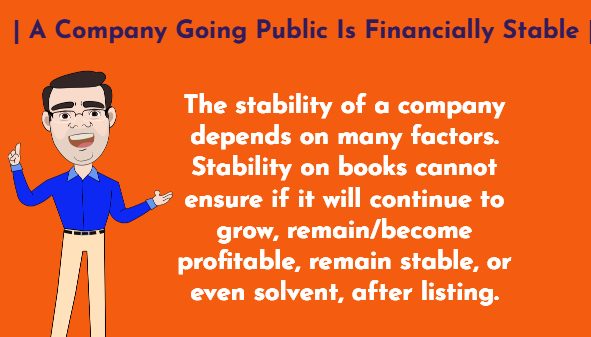
Myth 4: A Company Going Public Is Financially Stable

Going public means the company met SEBI’s listing requirements. It doesn’t guarantee profitability, stability, or even survival. BYJU’S was preparing for an IPO while simultaneously being called out for questionable sales practices. Many companies that listed in 2021-22 during the bull run are now trading 50-70% below their issue price.

SEBI has tightened norms since 2024: higher minimum IPO sizes for SMEs (₹10 crore), doubled minimum retail application to ₹2 lakh, and proposed caps on first-day listing gains at 90%. These reforms exist because the old system wasn’t protecting retail investors.

Myth 5: All Retail Investors Get Allotment

In oversubscribed IPOs, the retail quota (35%) uses a lottery system. With average oversubscription of 23x, only 1 in 24 retail investors gets allotted. Your money is blocked for 5-7 days during the application process. If you don’t get allotted, you earned zero returns on that blocked capital. Do this 10 times a year and you’ve lost significant opportunity cost.

Myth 6: You’re Participating in Future Growth

By the time a company reaches IPO stage, most of the explosive growth has already been captured by VCs, PE funds, and early investors. The IPO is their exit strategy, not your entry strategy. You’re buying at the point where insiders are selling. That alone should make you pause.

Should I Invest in IPO

Caught up in IPO fever?

A structured financial plan helps you invest based on goals, not hype.

Talk to a Financial Advisor

What Nobody Tells You About IPO Investing

Here’s the part that IPO cheerleaders, brokers, and finfluencers will never say.

If you’re convinced that a company is worth investing in, you can always buy it after listing. The stock will be available on the exchange at market price. If the company is truly good, it will still be a good investment 6 months after listing, likely at a more reasonable valuation.

The urgency to “get in at IPO price” is manufactured. It’s FOMO dressed up as financial strategy. Benjamin Graham wrote about this 70 years ago: “Somewhere in the middle of a bull market, new issues start appearing. These are priced not unattractively at first. As the market rises, the quality of companies drops while the prices asked become exorbitant.”

The fact that you need to apply for an IPO during a specific window, with money blocked, competing with 23 other applicants for one slot, should tell you something about who this system is really designed for. It’s not designed for your benefit.

If you want exposure to IPOs without the gamble, invest through mutual funds. Many large-cap and flexi-cap funds are anchor investors in IPOs and can participate at scale with better due diligence than any retail investor can do alone.

Read – 7 Types of Indian Investors: Which One Are You?

The best IPO strategy? Don’t need one.

A diversified portfolio through mutual funds and SIPs beats IPO gambling for 99% of investors.

Start Your Financial Plan

Frequently Asked Questions

Should I invest in IPOs for listing gains?

Listing gains are unreliable. In early 2026, 7 of 11 mainboard IPOs had negative listing gains. SME listing gains crashed from 60%+ to 2.63%. If you’re treating IPOs as a quick money strategy, you’re speculating, not investing. A long-term SIP in a quality mutual fund will almost certainly outperform IPO gambling over 10+ years.

Is LIC a good stock to hold after its IPO?

LIC’s IPO price was ₹949. It traded below that level for extended periods after listing. As of 2026, it has recovered but the journey was painful for investors who expected quick returns. The lesson: even the most trusted Indian brand can be a bad investment at the wrong price. Always evaluate valuation, not just brand recognition.

What SEBI reforms have changed the IPO landscape?

Since 2024, SEBI has raised minimum SME IPO size to ₹10 crore, doubled minimum retail application to ₹2 lakh, proposed caps on first-day listing gains at 90%, introduced a draft abridged prospectus for better transparency, and tightened disclosure norms. These reforms aim to protect retail investors from low-quality listings.

How can I invest in IPOs safely?

The safest approach: invest through mutual funds that participate as anchor investors. If you must apply directly, limit IPO investments to 5% of your portfolio, only apply for companies with proven profitability (not concept-stage businesses), and be prepared to hold for 3-5 years rather than flipping on listing day.

An IPO is not an invitation to a party. It’s an invitation to buy someone else’s exit. Make sure you know the difference.

It’s not a Numbers Game… It’s a Mind Game.

💬 Your Turn

Have you ever applied for an IPO expecting listing gains and been disappointed? Or made money? Share your real experience in the comments.